

Dos and Don'ts of Festival Wristbands, Mobile Tickets, and Transfers
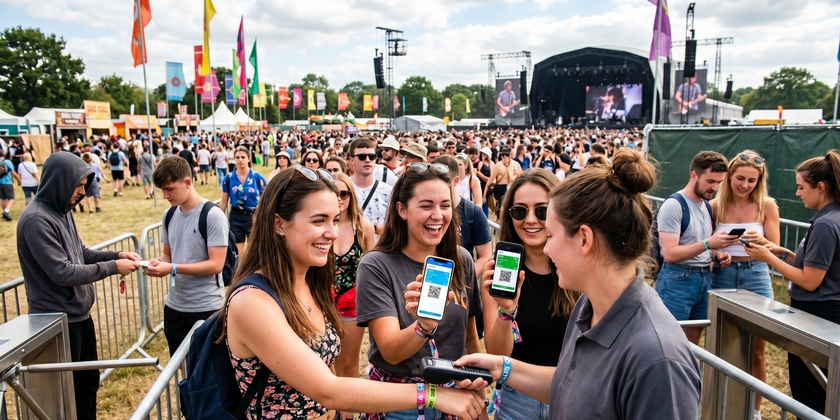
The lineup is set, the group chat is ready, and then you're standing at the gate, and something isn't working. This guide covers what to do and what to avoid with wristbands, mobile tickets, and transfers so you're inside with your friends, not stuck at the box office. Buy your festival tickets at Event Tickets Center and start on the right foot.
Why Your Ticket Format Matters More Than You Think
Getting the ticket is step one. What happens between purchase and gate is where most people go wrong. Different festivals use different entry systems, and each one has preparation steps that aren't obvious until you skip them.
Coachella Music Festival uses RFID wristbands that require online registration before you arrive. Bonnaroo does the same. Lollapalooza Chicago uses mobile QR codes that live in your phone's wallet app. The format changes the preparation, and the preparation determines whether you walk in on the first scan or spend your first hour at will-call.
| Festival | Entry Format | Registration Required |
|---|---|---|
| Coachella | RFID wristband | Yes, online before arrival |
| Bonnaroo | RFID wristband | Yes, linked to ID |
| Lollapalooza Chicago | Mobile QR code | No registration, download required |
| Outside Lands | Mobile QR code | No registration, download required |
| Governors Ball | Mobile QR code | No |
| Rolling Loud | Mobile QR code | No |
Festival Wristbands: What to Do and What to Avoid
The most common gate problems come from wristband errors that could have been fixed days earlier.
Activating and Registering Your Wristband Before the Event
Most major festivals ship wristbands inert. The band that arrives in your mailbox does nothing until you link it to an account and a valid ID through the festival's registration portal. That step is required before you arrive, not at the gate.
Registration typically opens weeks before the event. The deadline varies by festival, so check the specific portal as soon as your wristband arrives. An unregistered band at the gate usually means a detour to the box office, and that detour costs time you won't get back. Registering early also protects you if the band is lost or damaged: a linked wristband can often be deactivated and reissued. Festivals like Governors Ball handle this through their ticketing platform; always verify the exact process on the festival's official site.
Common Wristband Mistakes
Wristband mistakes that get people turned away at the gate
- Wrong wrist: Some festivals specify which wrist the band goes on. Check the instructions that came with your wristband before you put it on.
- Too loose: A wristband that slides around can fall off or get flagged as tampered. It should fit snugly, not tight enough to be uncomfortable, but with no room to slip over your hand.
- Cutting it off early: Wristbands use tamper-evident closures. A cut band is a dead band. If you remove it before the final day, it cannot be reattached.
- Buying from an unverified seller: Wristbands purchased outside official channels may arrive deactivated, already scanned, or registered to someone else's ID. There's no way to know until you're at the gate.
- Ignoring the registration email: The activation link often comes in a plain email that reads like a receipt. Check your spam folder and complete registration before the deadline, not the morning of the event.
Mobile Tickets: The Dos and Don'ts of Phone-Based Entry
Mobile entry is the default for most festivals now. It's convenient until your phone has no signal, your battery is at 4%, or your QR code is in an email you can't load. Preparation takes five minutes and prevents all of it.
Preload, Screenshot, and Prepare for Dead Zones
Download your ticket to your phone's wallet app before you leave home. Apple Wallet and Google Wallet both store tickets offline, so they display without a signal at all. Do this the night before, not in the rideshare on the way there.
Take a screenshot of the QR code as a backup. It's a redundant step, but cell service at festivals like Austin City Limits is notoriously unreliable. If your ticket lives in an email app that requires a data connection to load, you're stuck. Screenshots display regardless of signal. Arrive with a full charge and bring a portable charger because a dead phone is also a dead ticket.
What Not to Do With Your Mobile Ticket
Don't share screenshots publicly, as barcodes can be stolen; don't assume you can pull it up on-site with a weak signal, and don't transfer it at the last minute without confirming the recipient actually received it. Cover the risk of duplicate scans if a barcode gets shared or leaked.
Ticket Transfers: How to Do Them Right
Most ticket transfer problems come from doing them at the last possible moment or through channels that offer no protection.
Safe Transfer Practices
Use the official transfer tool on the ticketing platform whenever it's available. That means the recipient gets the ticket directly, there's a record of the transaction, and both parties can confirm it went through. Before you send, double-check the recipient's name and email address. A transfer sent to the wrong address is difficult to reverse, and some platforms require customer service intervention.
Transfer early, because the parking lot an hour before gates is the worst time to discover a problem. Festivals like Summerfest lock transfers after a cutoff date; check the specific event's policy when you know someone else needs the ticket. Ask the recipient to confirm they've received the transfer and completed any required steps on their end before you assume it's done.
Transfer Red Flags
Signs a festival ticket transfer or sale is a scam
- Screenshot-only transfers: A seller who insists on sending a screenshot instead of using the official transfer tool has no legitimate reason to avoid it. This is the clearest scam signal in festival ticketing.
- Payment apps with no buyer protection: Venmo, Cash App, and Zelle offer no recourse if the ticket is fake or deactivated. If something goes wrong, the money is gone.
- Wristbands from unverified sources: A physical wristband shipped from a stranger with no registration confirmation could be deactivated, duplicated, or tied to someone else's ID.
- "My friend can't go" stories: This framing is used frequently in festival scams. Ask for proof of the original purchase, such as a receipt or platform-based verification. Urgency is a pressure tactic, not a reason to move faster.
- Prices that seem too good: Scam volume spikes in the two weeks before major festivals. If a deal looks significantly below market, treat it as a warning sign, not a bargain.
Buy Verified Festival Tickets at Event Tickets Center
Every step in this guide starts with having a legitimate ticket from a verified source. Fake wristbands, deactivated bands, and broken transfers are problems that begin at purchase, not at the gate. Event Tickets Center sells verified inventory with transparent pricing and a 100% Buyer Guarantee on every order, so your ticket is always backed. Shop festival tickets at Event Tickets Center and skip the gate-day guesswork.


